Buying a laptop under ₹60,000 in India has become much easier than it was a few years ago, but choosing the right model is still surprisingly difficult. At this price, you can find laptops with 16GB RAM, 512GB SSDs, capable Intel or AMD processors, Full HD displays and even some gaming laptops with dedicated graphics.
The problem is that specifications alone do not tell the whole story. A laptop with a newer-looking processor may not necessarily offer better overall value than a slightly older model with more RAM, better cooling or a better display. Similarly, a laptop designed for office work may be a much better choice for a student than an inexpensive gaming machine.
For this guide, the focus is on laptops that make sense for real-world use in India. The shortlist considers performance, memory, storage, display quality, portability, battery expectations, upgradeability, build quality and overall value rather than simply choosing the most powerful specification sheet.
Current September 2026 market listings show options such as the Acer Aspire 15 with Ryzen 7 and 16GB RAM, Acer Aspire 3 configurations with Core i5 and 16GB RAM, Lenovo models with 16GB memory, and several gaming laptops around the ₹55,000–₹60,000 range. Prices can change frequently depending on the retailer, configuration and ongoing offers.
Best Laptops Under ₹60,000 in India at a Glance
| Laptop | Best For | Processor | RAM / Storage | Main Highlight |
|---|---|---|---|---|
| Acer Aspire 15 | Best overall performance | AMD Ryzen 7 7730U | 16GB / 512GB SSD | Strong multitasking |
| Acer Aspire 3 | Best value for everyday work | Intel Core i5-1334U | 16GB / 512GB SSD | Balanced performance |
| Acer Aspire 3 15.6-inch | Best display-focused value | Intel Core i5-1334U | 16GB / 512GB SSD | Full HD IPS display |
| Lenovo V15 | Best budget productivity option | Intel Core i3 13th Gen | 16GB / 512GB SSD | Affordable 16GB configuration |
| Lenovo IdeaPad Slim series | Best for students | Intel Core i3 / AMD Ryzen options | Up to 16GB / 512GB | Everyday portability |
| ASUS TUF Gaming A15 | Best for budget gaming | AMD Ryzen 7 | 16GB / 512GB SSD | Dedicated graphics |
| MSI Thin 15 | Best entry-level gaming option | Intel/AMD configuration dependent | Varies | Gaming-oriented hardware |
1. Acer Aspire 15 – Best Overall Performance Under ₹60,000
The Acer Aspire 15 is one of the most interesting options for buyers who care more about everyday performance than premium design.
One currently listed configuration uses the AMD Ryzen 7 7730U processor with 16GB DDR4 RAM and a 512GB SSD. A September 2026 listing puts this configuration around ₹54,990, although the actual selling price can change.
The biggest advantage here is the combination of an eight-core processor and 16GB memory. That makes the laptop particularly suitable for people who regularly multitask.
You can comfortably use a browser with many tabs, Microsoft Office applications, video calls, music, messaging applications and other productivity software without immediately running into the limitations commonly associated with entry-level laptops.
The integrated Radeon graphics are not intended to compete with a dedicated gaming GPU, but they are adequate for everyday graphics workloads, media consumption and lighter games.
Who should buy the Acer Aspire 15?
This laptop makes the most sense for:
- Office professionals
- Students
- Freelancers
- Programmers
- People who multitask heavily
- Users who want 16GB RAM without crossing ₹60,000
Limitations
It is not the ideal choice for serious gaming or demanding 3D work because it relies on integrated graphics.
The display specification should also be checked carefully before purchasing because different Aspire configurations can have different panels.
2. Acer Aspire 3 – Best Value for Office Work and Students
The Acer Aspire 3 family offers several configurations in the ₹50,000–₹60,000 segment.
One current configuration listed in India uses an Intel Core i5-1334U processor, 16GB DDR4 RAM and a 512GB SSD at around ₹49,990. Another 15.6-inch configuration with the same processor and 16GB RAM is listed around ₹55,990.
This combination is particularly attractive for students and professionals because 16GB RAM is increasingly useful for modern multitasking.
For example, if you are simultaneously working with Chrome, Word, Excel, Teams, email and cloud applications, 16GB provides considerably more breathing room than an 8GB configuration.
The Core i5-1334U is also a sensible processor for general productivity. It is designed more for efficient everyday computing than high-end gaming.
Best uses
The Acer Aspire 3 is suitable for:
- College work
- Online classes
- Microsoft Office
- Excel
- Browsing
- Coding
- Video conferencing
- Streaming
- General productivity
What about gaming?
This is primarily a productivity laptop. Integrated graphics can handle casual gaming, but buyers looking for modern AAA gaming should consider a laptop with dedicated NVIDIA graphics instead.
3. Acer Aspire 3 15.6-inch – Best Balanced Choice
The larger 15.6-inch Aspire 3 configuration deserves consideration if you want a more comfortable screen for long work sessions.
The current listing includes a Full HD IPS LCD panel, Intel Core i5-1334U processor, 16GB RAM and 512GB SSD. The listed price is around ₹55,990.
The IPS panel is particularly important because display technology can have a major impact on everyday usability.
For spreadsheets, documents, browsing and streaming, a 15.6-inch Full HD display provides considerably more workspace than smaller low-resolution panels.
The 16GB memory also makes this configuration more suitable for long-term everyday use than many 8GB laptops in the same price range.
Who is it for?
Choose this type of configuration if you want:
- A larger screen
- Good productivity performance
- 16GB RAM
- 512GB SSD
- A laptop for study and work
- A mainstream Windows laptop rather than a gaming machine
4. Lenovo V15 – Best Budget Productivity Laptop
Lenovo’s V-series models are worth considering if your primary objective is productivity rather than entertainment.
A current September 2026 listing shows a Lenovo V15 with a 13th-generation Intel Core i3 processor, 16GB RAM and 512GB SSD at approximately ₹51,220.
At this price, the 16GB memory configuration is one of the strongest reasons to consider it.
The processor is not designed for demanding creative workloads, but the overall configuration can make sense for basic office work, browsing, documents, email and online meetings.
This is an important distinction when buying a laptop.
You do not necessarily need a high-end processor if your daily workload consists mainly of Microsoft Office, web applications, accounting software, communication tools and document work.
Best for
The Lenovo V15 is better suited to:
- Office workers
- Students
- Administrative work
- Browsing
- Documentation
- Online meetings
- Basic programming
Not recommended for
Avoid choosing this type of machine if your primary goal is:
- AAA gaming
- Professional video editing
- 3D rendering
- Advanced animation
- Heavy GPU workloads
5. Lenovo IdeaPad Slim 3 – Best for Students
The Lenovo IdeaPad Slim 3 family continues to be an important option in the affordable laptop segment.
Current Indian listings show multiple IdeaPad Slim 3 configurations around the ₹55,000–₹58,000 range, including both Intel and AMD variants.
The biggest advantage of the IdeaPad Slim approach is its balance between portability and everyday productivity.
For college students, a laptop needs to do more than simply run a browser.
You may need to work on presentations, PDFs, assignments, coding projects, spreadsheets, online classes and research while keeping multiple applications open.
A 16GB configuration is therefore preferable if your budget allows it.
Why students should consider it
The IdeaPad Slim series is particularly appropriate for students who want:
- A mainstream Windows laptop
- Reasonable portability
- SSD storage
- Good everyday performance
- A comfortable keyboard
- A laptop suitable for study and entertainment
Before buying, however, check the exact RAM configuration. Some IdeaPad Slim models around this price use 8GB RAM while others offer 16GB.
6. ASUS TUF Gaming A15 – Best Gaming Option Around ₹60,000
Gaming changes the buying equation completely.
For gaming, processor performance is important, but the dedicated GPU is usually the component that matters most when deciding whether a laptop can handle modern games.
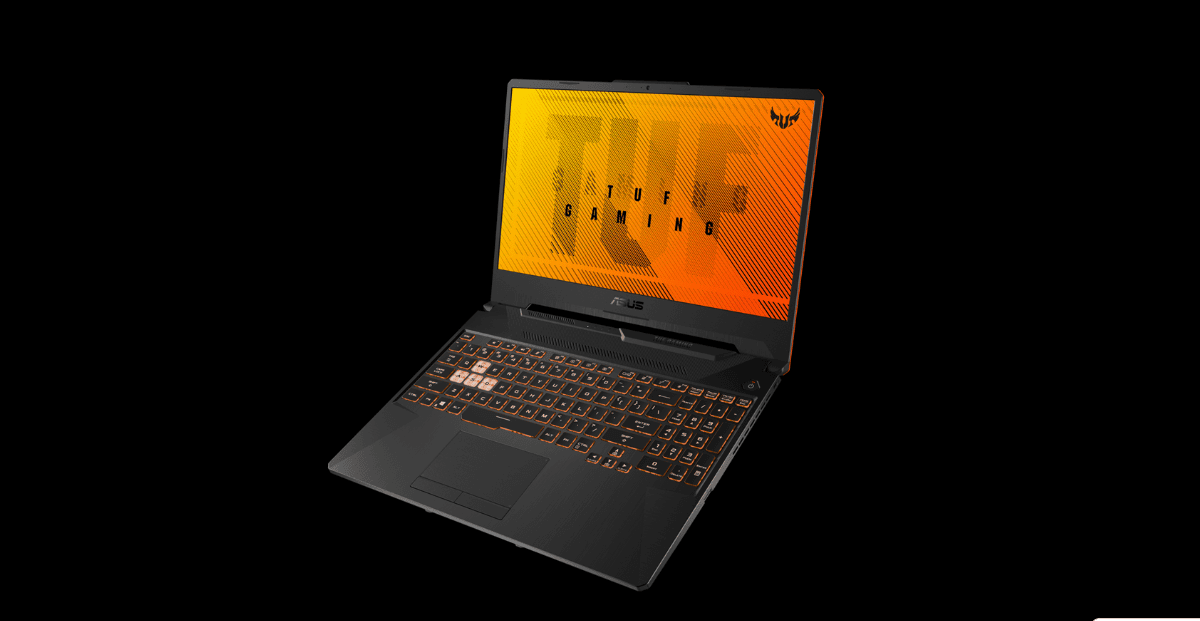
Current September 2026 listings show the ASUS TUF Gaming A15 FA566NFR-HN259W around ₹55,990 with an AMD Ryzen 7 processor, 16GB RAM and 512GB SSD.
A gaming laptop in this segment can be substantially more capable for graphics-heavy workloads than an ordinary office laptop with a similar price.
However, there are trade-offs.
Gaming laptops tend to be heavier, consume more power and produce more fan noise when their processors and graphics hardware are under sustained load.
They are also less convenient for carrying around campus or between meetings compared with a thin-and-light laptop.
Who should buy it?
The ASUS TUF Gaming A15 makes sense for:
- Gamers
- Students who also game
- Users who need dedicated graphics
- Entry-level content creators
- Users interested in GPU-accelerated applications
Important consideration
Do not buy a gaming laptop simply because it has a powerful-looking processor.
Check the exact GPU, graphics memory, display refresh rate, cooling system, RAM configuration and power adapter before making the final decision.
7. MSI Thin 15 – Another Gaming Choice
MSI also has gaming-oriented laptops competing around the ₹60,000 mark.
Current Indian listings show the MSI Thin 15 B13UC configuration around ₹59,990.
The Thin series targets users who want gaming hardware in a relatively slimmer chassis.
The advantage is straightforward: you get access to dedicated graphics hardware without necessarily buying one of the larger and heavier gaming machines.
However, thin gaming laptops involve compromises.
A slimmer chassis has less physical space for cooling than a larger gaming laptop. This makes thermal performance particularly important during long gaming sessions.
Best for
The MSI Thin 15 is worth considering if you want:
- A gaming-oriented laptop
- Dedicated graphics
- A relatively portable gaming design
- A laptop for gaming and college use
Always check the exact configuration before purchasing because the Thin 15 name covers multiple hardware combinations.
8. What Should You Look for in a Laptop Under ₹60,000?
The biggest mistake buyers make in this segment is choosing a laptop solely by processor name.
A good ₹60,000 laptop should be evaluated as a complete system.
Processor
For general productivity, modern Core i3/Core i5 and Ryzen 5/Ryzen 7 options can all make sense depending on the exact generation and power class.
Do not assume that every newer processor automatically beats every older processor.
The exact processor model matters.
Two chips carrying different versions of the same branding can have substantially different core counts, power limits and performance characteristics.
RAM
If your budget reaches ₹60,000, 16GB RAM should be one of your main targets.
An 8GB laptop can still work for basic tasks, but 16GB provides much more flexibility for multitasking and longer-term use.
This is especially important for students and professionals who keep many browser tabs and applications open.
SSD Storage
A 512GB SSD is the practical starting point for most buyers.
It provides enough space for Windows, applications, documents, projects and a reasonable collection of media.
If you regularly store large video files, games or photography projects, 1TB becomes more attractive.
Some current laptops in this segment are available with 1TB SSD configurations, so buyers should compare storage rather than assuming every model comes with 512GB.
Display
Do not overlook the screen.
A Full HD IPS display is generally preferable to a basic low-quality panel for everyday productivity.
If you consume a lot of video content or work with photographs, display brightness, colour reproduction and viewing angles become increasingly important.
For gaming, refresh rate also matters.
A 120Hz or higher panel can make compatible games and general scrolling feel smoother than a standard 60Hz display.
Battery Life
Manufacturers’ battery-life claims should not be treated as guaranteed real-world figures.
Actual battery life depends on brightness, processor workload, browser usage, Wi-Fi activity, applications and power settings.
For students and professionals, battery efficiency may be more important than having the fastest possible processor.
Build Quality
A laptop can have excellent specifications and still be unpleasant to use if the chassis, keyboard or trackpad is poor.
Look at:
- Hinge construction
- Keyboard comfort
- Trackpad quality
- Chassis rigidity
- Weight
- Port placement
- Webcam quality
These features affect your experience every day.
9. 8GB vs 16GB RAM: Which Should You Buy?
For a new laptop around ₹60,000, I would generally prefer 16GB RAM.
Eight gigabytes is still usable for browsing, documents, streaming and basic study, but modern applications and browsers can consume memory quickly.
With 16GB, multitasking becomes much more comfortable.
For example, a student can keep a browser, PDF reader, Word, PowerPoint and messaging application open without having to constantly close programs.
For professionals, 16GB is also more appropriate for spreadsheets, browser-heavy workflows, meetings and productivity software.
If the RAM is soldered and cannot be upgraded, choosing 16GB at purchase becomes even more important.
10. Is a Gaming Laptop Better Than a Normal Laptop Under ₹60,000?
Not necessarily.
It depends entirely on what you do.
If you mostly study, work, browse the internet and attend meetings, a normal productivity laptop can be the better choice.
A gaming laptop becomes more attractive when you need dedicated graphics for games, GPU-accelerated creative applications or certain technical workloads.
Gaming laptops generally have larger cooling systems and more powerful hardware, but they can also be heavier and less efficient on battery.
For an office professional who travels every day, a lightweight laptop may be much more useful than an inexpensive gaming machine.
11. Best Laptop Under ₹60,000 for Students
For students, the priority should normally be a combination of 16GB RAM, 512GB SSD, a good Full HD display, reasonable portability and dependable everyday performance.
The Acer Aspire 15, Acer Aspire 3 and Lenovo IdeaPad Slim configurations are strong categories to consider.
Students studying engineering, computer science or other technical subjects should also consider software requirements.
If your course involves programming, virtual machines, CAD, 3D applications or other demanding software, you may need a more powerful processor or dedicated graphics.
Do not buy a basic laptop simply because it fits the budget if your academic software has significantly higher requirements.
12. Best Laptop Under ₹60,000 for Office Work
Office users should prioritize reliability and usability over gaming specifications.
A 16GB RAM and 512GB SSD configuration is an excellent combination for typical office workloads.
The Acer Aspire 3 and Lenovo V15 are examples of configurations that make more sense for productivity-focused buyers than gaming laptops.
A comfortable keyboard, good webcam, useful ports and manageable weight can be more valuable than a dedicated GPU.
13. Best Laptop Under ₹60,000 for Coding
Coding does not automatically require a gaming laptop.
For web development, Python, Java, C++, database work and many other programming workloads, a capable CPU, 16GB RAM and an SSD are more important than a dedicated GPU.
If you work with Android development, virtual machines, containers or large development environments, 16GB should be considered the minimum target where possible.
Screen size also matters.
A 15.6-inch display gives you more space for code and documentation, while a 14-inch laptop is easier to carry.
An external monitor can solve the workspace issue later.
14. Best Laptop Under ₹60,000 for Video Editing
Video editing is more demanding than normal office work.
For basic 1080p editing, a strong CPU and 16GB RAM can provide a reasonable starting point.
However, serious editing workloads benefit from dedicated graphics, faster storage and better displays.
If you edit 4K footage regularly, use heavy effects or work extensively in applications such as Premiere Pro or DaVinci Resolve, increasing your budget may be worthwhile.
A budget gaming laptop with dedicated graphics can be more suitable for this purpose than a thin office laptop.
15. Can You Get an OLED Laptop Under ₹60,000?
Yes, occasional OLED options can appear around this budget, particularly through discounts or older configurations.
Current Indian price listings include OLED laptops around the mid-₹50,000 range, although exact models and availability can change.
OLED can provide excellent contrast, deep blacks and attractive image quality.
However, do not automatically choose OLED over every IPS laptop.
For some users, a better processor, 16GB RAM, larger SSD or better battery life may provide more practical value.
The right choice depends on your workload.
16. Should You Buy an 8GB Laptop in 2026?
If the laptop is inexpensive and intended for basic use, 8GB can still be acceptable.
But if you are spending close to ₹60,000, I would strongly favour 16GB whenever possible.
The reason is not simply today’s performance.
A laptop is typically expected to remain useful for several years. Software becomes more demanding, browser workloads grow and multitasking habits change.
Starting with 16GB gives you more headroom.
If the RAM cannot be upgraded later, this becomes an even stronger reason to choose the larger configuration.
17. How Much SSD Storage Do You Need?
For most students and professionals, 512GB is a sensible starting point.
It provides enough room for the operating system, applications, documents, projects and everyday files.
Choose 1TB if you regularly work with:
- Large video files
- Games
- RAW photographs
- Large software packages
- Offline media
- Extensive project archives
Remember that available storage is always lower than the advertised capacity because the operating system and system partitions consume some space.
18. What About Battery Life?
Battery life is one of the areas where buyers should be particularly careful.
A manufacturer may advertise a certain battery runtime under controlled conditions, but your actual experience can be different.
A laptop running at high brightness with dozens of browser tabs, video calls and background applications will consume substantially more power than one performing light text editing.
Thin-and-light productivity laptops generally have an advantage in mobility, while gaming laptops are usually designed around performance and access to mains power.
If you travel frequently, battery efficiency should be a major part of your buying decision.
19. Should You Buy a Laptop With a Dedicated GPU Under ₹60,000?
If gaming or GPU-intensive work is important, yes.
A dedicated GPU can provide a major advantage over integrated graphics for compatible games and creative workloads.
But there is no free performance.
Gaming laptops typically consume more power, generate more heat and weigh more than mainstream productivity laptops.
So the dedicated GPU should be treated as a feature you pay for because you need it, rather than automatically assuming it makes the laptop better for everyone.
20. What I Would Choose at Different Budgets
If the budget is around ₹50,000, prioritize 16GB RAM and a 512GB SSD over unnecessary premium features.
Around ₹55,000, you can start looking seriously at stronger Core i5 and Ryzen configurations.
Close to ₹60,000, compare both productivity laptops and entry-level gaming models.
If you need gaming, look for dedicated graphics.
If you need office productivity, portability and battery life, prioritize a well-balanced thin-and-light model.
If you need content creation, compare CPU performance, GPU capability, RAM and display quality rather than focusing on only one specification.
Frequently Asked Questions
Which is the best laptop under ₹60,000 in India?
There is no single best laptop for every user. The Acer Aspire 15 with Ryzen 7 and 16GB RAM is an attractive choice for general performance, while gaming-focused buyers should consider dedicated-GPU models such as ASUS TUF or MSI gaming configurations. Current listings show these categories competing around this budget.
Is 16GB RAM enough for a laptop in 2026?
Yes. For most students, office users, programmers and general multitaskers, 16GB is a strong amount of RAM. It provides substantially more headroom than 8GB for modern multitasking.
Is 512GB SSD enough?
For most users, yes. A 512GB SSD is a practical balance between capacity and price. Heavy gamers, video editors and photographers may benefit from 1TB or additional external storage.
Which laptop is best for students under ₹60,000?
Students should generally prioritize 16GB RAM, 512GB SSD, a good Full HD display, comfortable keyboard and reasonable portability. Acer Aspire and Lenovo IdeaPad Slim configurations are worth considering depending on the exact configuration and price.
Can I get a gaming laptop under ₹60,000?
Yes. Current Indian listings include gaming-focused options from ASUS, MSI and other brands around the ₹55,000–₹60,000 range, although exact configurations and availability can change.
Is an i5 laptop better than a Ryzen 7 laptop?
Not necessarily. Processor branding alone is not enough to determine performance. The exact chip generation, architecture, power class, core configuration and laptop cooling all matter.
Should I buy an OLED laptop under ₹60,000?
An OLED laptop can be an excellent choice if display quality is your priority. However, compare the complete configuration. A good IPS laptop with 16GB RAM, a stronger processor and better battery life may be more useful for some buyers.
How long should a ₹60,000 laptop last?
A well-chosen laptop can remain useful for several years, but longevity depends heavily on workload, build quality, thermals, battery health, software requirements and whether the hardware remains adequate for your applications.
Final Verdict
The best laptop under ₹60,000 depends more on your workload than on the name printed on the processor.
For general productivity and multitasking, the Acer Aspire 15 with Ryzen 7 and 16GB RAM is one of the strongest configurations currently appearing around this budget.
For office work and students, Acer Aspire 3 and Lenovo IdeaPad Slim configurations provide a sensible balance of performance, memory and storage.
For buyers who need dedicated graphics, gaming-focused models such as the ASUS TUF Gaming A15 and MSI Thin series deserve closer attention.
The most important advice is to compare the exact model number rather than buying based only on a product family name. A single laptop series can contain several processors, display types, RAM configurations and storage options.
At this price, try to target 16GB RAM and at least a 512GB SSD, then choose the processor, display, GPU and portability characteristics based on how you actually use your laptop.
Prices and configurations in the Indian market can change quickly, so always verify the exact specification and current selling price before placing an order.